
1. I highlight and comment passages in PDF Expert (which is my layer 1):
/quality(80).jpeg)
2. I export my highlights and annotations in text format:
/quality(80).jpeg)
Which results in:
/quality(80).jpeg)
3. I copy and paste my highlights and annotations into Microsoft OneNote:
/quality(80).jpeg)
4. And then I’m ready to go to layer 2, layer 3, and layer 4:
/quality(80).jpeg)
Tips and tricks
When doing Layer 3 (highlighted passages), I use gray color instead of yellow because the searching tool in OneNote already uses yellow, which can get confusing when looking for a keyword. So I get:
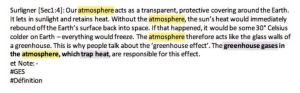
instead of:

When I annotate or comment, I make sure to use asterisks. Otherwise, it’s hard to distinguish the highlights from the annotations once the text is exported:
/quality(80).jpeg)
I do the same when I summarize a passage: I add ((( resume ))) to make it easier to distinguish later on.
Hope this helps
Follow us for the latest updates and insights around productivity and Building a Second Brain on X, Facebook, Instagram, LinkedIn, and YouTube. And if you're ready to start building your Second Brain, get the book and learn the proven method to organize your digital life and unlock your creative potential.