
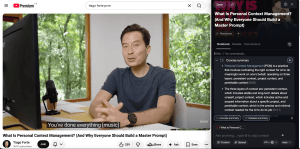
Not long ago, we published a video on something I call personal context management, or PCM.
The idea behind it is simple: The real potential of AI, and of you, comes from the context that only you can give it. The knowledge in your head. The files on your computer. The articles and videos you’ve saved because something about them mattered to you.
For ten years, I’ve taught personal knowledge management (PKM), a way to preserve and resurface your best thinking, what we now call building a Second Brain. AI has changed who’s reading those notes. They’re no longer just for you. They’re inputs to a system that can act on your behalf. That’s the shift PCM is about. You stop being a passive consumer of information and start being the curator of your own context.
So when a company reached out whose whole product is built on that same idea, we paid attention. It’s called Recall – an AI knowledge engine, essentially a personal knowledge base, where everything you save, your articles, videos, and notes, lives in one place so you can talk to an AI about it.
To be upfront: this post is sponsored by Recall. That’s exactly why we wanted to run a real test instead of taking anyone’s word for it. We handed the tool to four people on our team and asked them to work inside it for three weeks on their actual projects. Some of what they found surprised us. Some of it didn’t land. And most of it turned out to be a lesson in PCM.
The three layers of context
Before I share the results of our test, let’s talk about one framework that will make sense of everything that follows.
Context isn’t a single thing. It works on three layers.
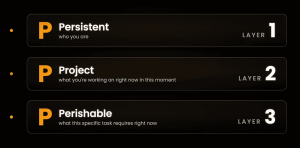
The first is persistent context. This is where you tell the AI who you are: your role, your values, how you like to communicate, the durable facts that shape almost everything you do. I keep all of it in what I call my master prompt, saved in the AI’s custom instructions, so I never have to reintroduce myself at the start of a conversation.
The second is project context. This is what you’re actively working on right now. The decisions you’ve made, the research you’ve done, the deadlines, the people involved. If you use the PARA Method, this already lives in a single project folder. You’ve been preparing for PCM without knowing it.
The third is perishable context. This is the small, specific slice the AI needs for one particular request. The last bit of nuance that tends to live only in your head.
Persistent, project, perishable. Hold onto those three, because nearly every high and low our team hit traces back to one of them.
Four people, four questions
When we started this test, each person on our team brought their own question, tied to the tool they already leaned on.
Julia, our general manager, has lived inside Evernote for more than ten years. Thousands of notes and a decade of muscle memory. Could Recall be a real Evernote alternative for her? She was confident enough to cancel her Evernote subscription on camera before she’d even finished the test.
Olesya runs research for our YouTube channel, and her setup was, in her words, chaotic. A pile of browser tabs, a ghost YouTube account, a few AI tools that don’t talk to each other. Could one tool do the research and hand her something usable?
Joey runs our operations and wants to make content for himself, but his system was held together with duct tape. Could Recall pull everything into one place so he could stop fiddling and start writing?
Jen, our community manager, has written on Substack for six years. Her question went deeper than saving time. She wanted to stop losing her own public-facing ideas and to keep sounding like herself while working with AI.
They shared one thing: All four came in using AI every day, mostly Claude, which had learned how they think. In PCM terms, Claude had spent months building up their persistent context. (Remember that, it matters later.)
What worked: curating context pays off
The wins came fast, and they clustered around a simple truth: When you give the AI good context, you get better work back.
The Recall web clipper (available on Chrome and Firefox) was the clear favorite. One click saves an article or video, and Recall shows you a short summary right away, so what you saved doesn’t vanish into a pile. Julia loved Evernote’s clipper for a decade and said Recall’s is just as good. Every clip is a small act of curating context.
Then there’s the chat. You can talk to your own saved notes, and the AI stays grounded in your library while still pulling fresh information from the web. (There’s also the option to exclude web search so that the chat interaction focuses exclusively on your notes.) When the chat produces something useful, a project plan or an outline, one click saves it back into your notebook as a note. No copying an artifact out of one app and pasting it into another.
Joey ran the test that stuck out the most. He gave both Recall and Claude the same prompt, using the same model, and asked for content ideas. Claude knew a lot about him. Recall had his library of content. Recall’s ideas were clearly better because it had read the pieces of content he’d saved precisely.
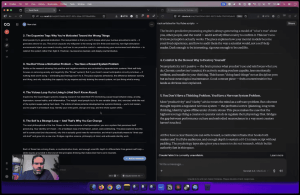
That’s the first identity shift of PCM. Your job stops being about doing the work and starts being about finding and gathering the best, most specific, most relevant material. The quality of your context beats the cleverness of the model. Joey’s own curated library was the fuel.
A few more examples: Julia clipped a stack of James Hoffmann coffee videos she’d meant to watch, combined them under one tag, and had Recall build her a home-barista study guide from the lot. Olesya turned competitor videos into a research brief for me to riff on, saving the hours she’d normally spend watching everything end to end. Jen added footnotes to her latest Substack piece by linking the notes she’d used as sources, and a reader wrote back to say her writing seemed more thought-through.
For anyone who consumes a lot of information through video, one small feature earned its keep. Save a YouTube video, and Recall pulls the full transcript with clickable timestamps, so you can jump to the two minutes that matter instead of watching the whole thing.
The learning layer: feeding your first brain, not just your AI
PCM isn’t only about feeding context to a machine. Some of it still needs to land in your own head.
Recall can turn anything you’ve saved into a quiz, then resurface those questions over time through spaced repetition so the material sticks.
Olesya built a quiz from our AI Second Brain cohort material and said the hard questions made her think rather than nod along.
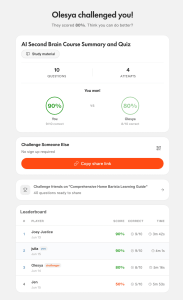
Julia quizzed herself on her coffee guide because she didn’t want the brewing ratios sitting in a note. She wanted them in her head.
For a student, or anyone learning a hard topic, this might be the part that matters most.
What didn’t work, and the gap they all hit
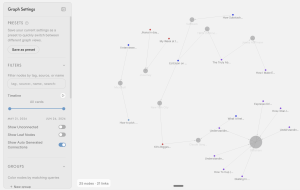
Not everything landed. The clearest miss was the graph view, the map of your notes with lines drawn between related ideas. It’s a feature popularized by network-based note-taking apps like Roam Research and Obsidian, and Recall added its own version. It didn’t land with anyone on the team. Every tester opened it, felt overwhelmed, and moved on. I’ll say it plainly: I’ve yet to meet a single person who swears by the graph view as a truly useful feature, in Recall or any other tool. It looks impressive. In practice, it’s a nice-to-have, not something you’ll likely come back to.
There was also a restriction on file formats. Recall couldn’t take CSV or text files directly, and it couldn’t read the comments under a YouTube video, which, for a research team, is a real goldmine to leave on the table.
The biggest gap was one all four team members hit, and it maps straight onto our PCM framework. Recall knew their content. It didn’t know them. There was no place for a master prompt, no persistent memory of who they were between chats. Julia was surprised it didn’t even know her name. That’s layer one missing. For anything personal, self-coaching, editing in their own voice, wrestling with an idea that needed real background, all four reached back for Claude, which had that persistent context built up over time.
This is where I want to give the Recall team real credit. We passed all of this along, and they moved fast. Before we’d even finished filming, they’d shipped two of our biggest asks: a place to add your persistent context as a master prompt (Recall Personas) and support for the text files (see all the content Recall supports here) that we’d been missing. Getting feedback into a product that quickly is rare, and it says a lot about the people building this.
The deeper shift: you’re really curating yourself
Two more shifts came up in the test, and they go deeper than any feature.
The first is about where your time goes. The more thoughtfully you manage your context, the less time you spend doing the work yourself. You set up the environment and let the AI execute. This is delegation, just to a system instead of a person, and the constraint is the same: the quality of your handoff determines the quality of the result. Joey’s real blocker was the blank page. Recall reduced the friction because he’d handed it good context to start from, and he’s shipping again after two years away from content creation.
The second shift is the deepest. AI flattens everything it touches. The way you stand out is by getting clearer about what you really want, your taste, your perspective, your opinions. Jen felt this sharply. Recall was excellent for objective idea work, holding a conversation with writers she admired. But for her own first-person voice, she still reached for her master prompt in Claude. What she was protecting wasn’t her notes, it was herself.
That’s the heart of PCM. What you’re really curating isn’t data. It’s you.
The verdict
For pulling in what you read and watch, curating your context, and turning it into something you want to make, Recall is a great tool. It won’t replace the AI that knows you personally, at least not yet. But that was never the real point.
The point is the one we started with. Your own knowledge, the context only you have gathered, is the fuel for everything AI can do on your behalf. Recall makes that easier than anything else we tried.
Curious if Recall could replace your current setup? Get 30% off with code Forte30 through 1 August 2026.
And if you want to go further and build the full system, your own master prompt and the three layers of context working together, that’s what we teach in The AI Second Brain. Either way, the practice is the same. Curate your context, and you curate yourself.
Watch Recall in action

Frequently Asked Questions
Here are the questions we heard most about Recall, answered from our own three weeks of testing and Recall’s official documentation.
What is Recall?
Recall is a personal AI knowledge base. It saves, summarizes, and organizes the articles, YouTube videos, podcasts, PDFs, and notes you care about, then lets you chat with all of it in one place. Think of it as a library of everything you’ve read and watched, with an AI sitting on top that has read it too. (One quick clarification: this is Recall at recall.it, not Microsoft Recall or Recall.ai, which are unrelated products with similar names.)
Who is Recall for?
The answer depends on the job. If you want your AI and your notes together in one place, instead of maintaining a separate chatbot and a separate notes app and trying to wire them together, Recall is a strong fit. Julia compared it to Notion, which greets you with a blank page, and to Notebook LM, which has no easy mobile capture. Recall sits in between: grounded in your notes, easy to feed, and ready to go. It’s a great fit for researchers pulling in what they read and watch, and even better for students, thanks to the quizzes and spaced repetition.
How much does Recall cost, and is there a free version?
Yes, there’s a free tier, and it’s free forever with no credit card required. It includes unlimited saved content and unlimited notes, plus 10 AI summaries a month so you can try the AI features. If you want unlimited AI, there are two paid plans, Plus and Max, and you can see current prices on Recall’s pricing page. Recall also offers a 30-day refund and a 20% student discount. And if you’d like to try a paid plan, we’ve arranged 30% off with the code Forte30 through 1 August 2026.
Can Recall replace Evernote?
For Julia, our general manager, it did. She’d lived in Evernote for more than ten years and cancelled her subscription during the test. The web clipper, the instant summaries, the tags, and the fast mobile capture all carried over the habits she relied on. If Evernote is mainly where you capture and store what you find online, Recall is a capable Evernote alternative, with the bonus that you can chat with everything you’ve saved. If you lean on Evernote for tasks, calendars, and heavier document management, keep in mind that Recall stays focused on note-taking rather than being an all-in-one productivity suite.
Can Recall replace Claude or ChatGPT?
It depends on what you use them for. For questions about the content you’ve saved and read, Recall often gives better answers than a general chatbot, because it’s grounded in your own library. Recall’s founders use it as their main chatbot. But for anything that needs to know you personally, the persistent context you build up in Claude or ChatGPT over time, we found we still reached for those tools. Recall has since added a master prompt (Recall Personas) so you can give it that persistent context too, which closes a lot of the gap.
Recall also has an MCP connection, so you can stay inside Claude or ChatGPT and pull from your saved Recall notes right in the conversation. It’s read-only for now, but it means your knowledge base travels with you into the AI you already use.
Have a question we didn’t cover? Recall’s full FAQ goes deeper on plans, privacy, supported content, and how Recall compares to other tools.
Follow us for the latest updates and insights around productivity and Building a Second Brain on X, Facebook, Instagram, LinkedIn, and YouTube. And if you're ready to start building your Second Brain, get the book and learn the proven method to organize your digital life and unlock your creative potential.